
What is a CMS? WordPress vs. Website Builders
Executive Summary
The architectural foundations of the modern web are often misunderstood by those who rely on them most. For a business operating in the United States today, a website is no longer a static digital brochure; it is a primary revenue engine, a legal liability, and the most visible manifestation of brand authority. At the center of this infrastructure lies the Content Management System (CMS). To the uninitiated, the choice between a self-hosted platform like WordPress and an all-in-one website builder like Wix or Squarespace may seem like a matter of aesthetic preference. However, as this analysis will demonstrate, the distinction is fundamentally one of digital governance, long-term financial strategy, and the preservation of business sovereignty.
The Ontological Shift: From Static Code to Dynamic Governance
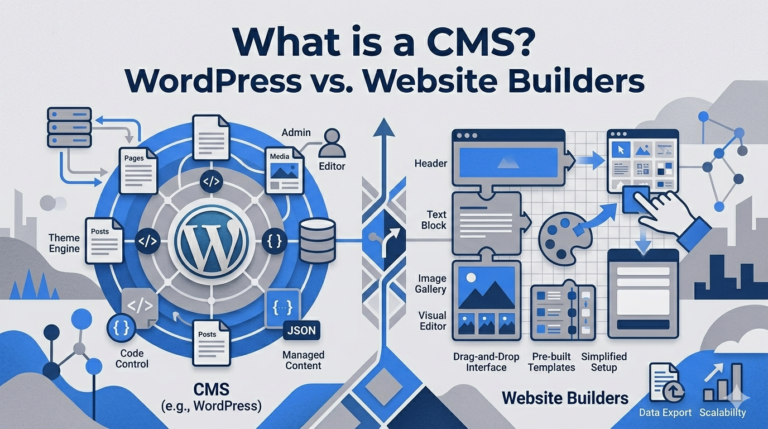
To understand what a CMS is, one must first appreciate the history of web delivery. In the early days of the internet, websites were composed of static HTML files. Every time a business owner wanted to change a single sentence or update a price, they had to manually edit the code and re-upload the file via File Transfer Protocol (FTP). This process was not only cumbersome but also created a significant bottleneck for growth. The advent of the Content Management System changed this by introducing a decoupling of the website’s content from its presentation layer.
A modern CMS is a software application that allows users to create, manage, and modify content without requiring specialized technical knowledge. It operates by storing content in a database (the data layer) and assembling it into a viewable web page using a template (the presentation layer) only when a visitor requests the URL. This dynamic assembly is the core mechanism that allows for the scaling of digital enterprises. Whether a site has five pages or five million, the CMS ensures that the underlying structure remains consistent while the content can be updated by anyone with administrative access.
In the current US marketplace, the term “CMS” has become a battleground for two competing philosophies of web development. On one side is the open-source model, epitomized by WordPress, which prioritizes flexibility, ownership, and an infinite customization ceiling. On the other side is the Software-as-a-Service (SaaS) model, championed by builders like Wix, Squarespace, and Shopify, which prioritizes convenience, speed-to-market, and a managed security environment.
The WordPress Paradigm: Sovereign Digital Infrastructure
WordPress is not merely a piece of software; it is a global phenomenon that powers over 43% of all websites on the internet.1 Its dominance is rooted in its origin as an open-source project. Unlike a proprietary website builder, the core code of WordPress is free to download, modify, and distribute. This openness has created a massive ecosystem of developers, designers, and specialized hosting providers, ensuring that a WordPress site is never “locked” into a single vendor’s ecosystem.
The Architecture of Ownership
The primary advantage of WordPress is ownership. When a business builds a site on WordPress.org (the self-hosted version), it owns the website “to the last bit”. This means the site files and the database belong to the business, not the platform provider. In the US, where platform volatility and policy changes can happen overnight, this level of control is a critical hedge against risk. If a hosting company raises its prices or changes its terms of service, a WordPress site can be moved to a new host within hours.
This ownership extends to the functional logic of the site. Through the use of plugins—of which there are over 60,000—a WordPress site can be transformed from a simple blog into a complex membership portal, a learning management system (LMS), or a high-volume e-commerce store. This extensibility is why WordPress is favored by service-based businesses that need to rely on sophisticated SEO, multiple contact points, or complex e-commerce logic.
The Mathematical Reality of Scaling
For many users, the perceived cost of WordPress is higher because it requires separate hosting and occasional professional help. However, the internal economics often tell a different story.
| Component | WordPress (Self-Hosted) | Typical Website Builder |
| Core Software | Free (Open Source) | Included in subscription |
| Hosting | $3–$100+/month (Variable) | Included in subscription |
| Domain Name | $10–$20/year | $15–$20/year (often free year 1) |
| Templates | Free to $200 (One-time) | Included in subscription |
| Plugins/Apps | Massive free library; premium options | Limited; often recurring fees |
While WordPress might have a steeper learning curve, it rewards those who invest in it with lower long-term recurring costs. Professional WordPress sites for small-to-medium businesses typically involve an initial build cost but avoid the “success taxes” that proprietary builders often impose as traffic and sales volume grow.
The Rise of the Walled Gardens: Wix, Squarespace, and Shopify
The alternative to the open-source model is the “walled garden” approach of SaaS website builders. These platforms—Wix, Squarespace, and Shopify—offer a closed environment where the hosting, security, and design tools are all handled by the platform provider. For many US-based entrepreneurs, the appeal is simple: “point, click, and publish”.
Wix: The Visual Freedom and Its Discontents
Wix has positioned itself as the leader in “pixel-perfect” design. Its unstructured drag-and-drop editor allows users to place elements anywhere on a page without being forced to follow a rigid grid. This makes it a popular choice for individuals without extensive design knowledge who want to launch a site quickly.
However, this freedom comes at a cost. Wix is a “closed system,” meaning your content and design are not easily exportable. If your business outgrows Wix’s capabilities—perhaps you need a custom CRM integration or a specific membership portal—you cannot simply move the site. You must rebuild it from scratch on another platform. Furthermore, while Wix is user-friendly, its unstructured editor can introduce bugs and workarounds that become frustrating for advanced users.
Squarespace: The Aesthetic Curation
Squarespace is often cited as the “best all-around” builder for those who prioritize aesthetics. It offers nearly 160 modern, mobile-friendly templates that are widely considered the best in the DIY category. Squarespace uses a structured “snap-grid” approach (Fluid Engine), which ensures that even non-designers create polished, professional-looking sites.
For creative industries in the US—photographers, architects, and boutique agencies—Squarespace provides a hassle-free, all-in-one solution. But like Wix, its simplicity can translate to less flexibility. It is frequently described as “design-first,” and while it excels at portfolios and simple service sites, it can feel restrictive for content-heavy blogs or complex e-commerce ventures.
Shopify: The E-Commerce Specialized Engine
If your primary goal is selling products, Shopify is often the first platform considered. Unlike Wix or Squarespace, which added e-commerce later, Shopify was built from the ground up for online selling. It provides robust tools for inventory management, payment processing, and shipping logistics.
Shopify is the “go-to” for businesses that rely heavily on conversions and plan for quick, aggressive growth. However, this specialized power comes with a higher price tag. In addition to a monthly subscription, Shopify often charges transaction fees unless you use their proprietary payment gateway, “Shopify Payments”.
Financial Forensics: The Total Cost of Ownership (TCO)
A critical error many US small businesses make is evaluating a CMS based only on the monthly sticker price. To understand the true financial impact, one must analyze the Total Cost of Ownership (TCO) over a three-year period.14
The Hidden Inflation of “Free” and “Cheap” Plans
Many website builders offer “free” plans, but these are generally unusable for a professional business. They force the use of a subdomain (e.g., user.wixsite.com) and display the provider’s branding, which damages brand credibility. To remove these and unlock essential features like e-commerce or booking systems, users must upgrade to higher-tier plans that can cost between $30 and $50+ per month.
| Platform | Entry-Level Cost | E-Commerce Cost | Hidden Fees/Taxes |
| Wix | $17/month | $29–$36+/month | App fees for basic features |
| Squarespace | $16/month | $23–$49/month | Transaction fees on lower commerce tiers |
| Shopify | $27–$39/month | $79–$299+/month | Transaction fees (up to 2%) if not using Shopify Payments |
| WordPress | $3–$10/month (Shared) | Free plugin (WooCommerce) | Developer time; premium plugins ($20–$200) |
The “Success Tax” on Growth
The most significant wealth transfer in the website builder industry is the transaction fee. Many “cheap” e-commerce builders charge 1% to 3% on every sale unless you upgrade to their most expensive plans. In contrast, a WordPress site using WooCommerce has zero platform transaction fees. For a growing store, this can save thousands of dollars annually, making the TCO for a WordPress site often 50% lower than closed platforms over a three-year period.
SEO Sovereignty: Technical Depth and Local Rankings
In the competitive US market, ranking on the first page of Google is often the difference between a thriving business and a failing one. While all major platforms have improved their SEO capabilities, there is a fundamental difference between “automated basics” and “technical sovereignty”.
The Limits of Automation
Website builders like Wix and Squarespace provide decent built-in SEO tools that handle meta titles, descriptions, and automatic sitemaps. This is often sufficient for simple portfolios or local businesses with low competition. However, these platforms can hit a “tool plateau”.
WordPress, through plugins like Yoast SEO or Rank Math, offers granular control over technical SEO that builders cannot match. This includes:
- Schema Markup: The ability to add detailed structured data (e.g., local business, product, recipe) that helps search engines understand the context of your page.
- Heading Structures: WordPress supports the full range of H1 through H6 headings, allowing for deeply layered content organization, while some builders like Squarespace may limit you to H1-H3.
- Performance Optimization: Because you have access to the server, you can implement advanced caching, image compression (WebP/AVIF), and script minification to achieve the high scores on Core Web Vitals that Google prioritizes.
Local SEO for the American Small Business
For a US service business targeting a specific geographic area (e.g., “Plumber in Dallas” or “Lawyer in Miami”), WordPress is the standout choice. It allows for the creation of structured location pages and advanced local SEO strategies that are more difficult to implement in the closed environments of Wix or Squarespace.
The Legal Imperative: ADA Compliance in the US
A critical and often overlooked factor for US businesses is the Americans with Disabilities Act (ADA). Ensuring that your website is accessible to individuals with impairments—vision, hearing, or cognitive—is not just a moral obligation; it is a legal requirement.
The 2024 Lawsuit Explosion
In recent years, the number of lawsuits for non-ADA compliance has exploded in the United States. Small businesses continue to bear the brunt of these legal actions, with nearly 67% of lawsuits targeting companies with less than $25 million in annual revenue.
| State | 2024 Website ADA Lawsuits | Key Trend |
| New York | 1,600 | Remains the leading state for filings |
| Florida | 629 | Showed a sharp 33% increase from 2023 |
| California | 485 | Frequent target due to state-level civil rights laws |
| Total (US) | 3,188–4,000+ | High volume of serial plaintiffs and firms |
Platform Responsibility vs. User Risk
There is a dangerous misconception that using a “modern” platform like Wix or Squarespace automatically makes your site ADA-compliant. In reality, the responsibility for compliance rests primarily with the website owner.
- Squarespace: While templates are generally well-coded, custom changes made by users can break compliance. Squarespace explicitly states their support team cannot advise on ADA compliance.
- Wix: Provides basic guidance but the flexibility of its drag-and-drop editor makes it easy for users to accidentally create non-compliant layouts.
- WordPress: Offers the potential for excellent accessibility if you select an “accessible-ready” theme and follow best practices. However, it requires active diligence to maintain compliance during customization.
Crucially, “accessibility widgets” or overlays are often a legal risk rather than a solution. In 2024, 25% of all ADA lawsuits explicitly cited such widgets as barriers to access. The only way to be certain of compliance is through a manual WCAG audit conducted by specialists.
The Maintenance Paradox: Managed vs. Self-Governed
The greatest “hidden cost” of a website is not financial—it is the cost of time and attention. This is where the divide between website builders and WordPress is most palpable.
The “Set and Forget” Appeal
Website builders like Wix and Squarespace are “managed” platforms. They handle server maintenance, security patches, and platform updates automatically. For a small business owner who wants to focus entirely on their craft, this “hands-off” security is genuinely valuable.
The Maintenance Burden of Sovereignty
In contrast, WordPress is a “hands-on” platform. You are responsible for keeping the core software, your theme, and all your plugins updated. A failure to do so can result in site breakage or security flaws, as WordPress sites are common targets for automated attacks due to their massive market share.
However, this burden is also a benefit. It means you can choose exactly when to update and can test changes in a “staging environment” before they go live. For a professional business that cannot afford a single hour of downtime, this level of control is essential.
E-Commerce and AI: The Next Frontier
As we move toward 2026, e-commerce is transforming. It is no longer enough to simply display products; you must provide “digital advice” and automation.
- Shopify is built for this “sales mentality,” with an ecosystem of over 13,000 apps and a robust API infrastructure for AI integrations.
- WooCommerce (WordPress) offers unmatched flexibility for complex shops that need custom checkout logic, subscription models, or membership-restricted sales.
For most US e-commerce brands, the decision comes down to the business model: Wix for small, beautiful shops; Shopify for serious scalers; and WordPress/WooCommerce for highly custom, content-driven commerce.
The Strategic Migration: Why Businesses Switch
Many businesses start on Wix or Squarespace because it is “quick and easy,” only to hit a wall later. This “frustration plateau” often leads to a migration to WordPress.
The reasons for switching are consistent:
- Ownership: Realizing they are “renting” their space and don’t own the underlying code.
- Scalability: The platform cannot handle complex features like gated memberships, online courses, or advanced analytics.
- Cost: Recurring monthly fees and app subscriptions become more expensive than maintaining a professional WordPress site.
Moving from a builder to WordPress is a significant undertaking. There is no “magic button.” Content must often be moved manually, and careful JavaScript redirects are required to preserve search rankings. This is why many experts “beg” business owners to start on WordPress if they have any intention of long-term growth.
US Readability Standards for Professional Content
For an article to be successful on a US website, it must meet high readability and engagement standards. US readers are impatient; they scan content in an “F-shaped pattern,” looking for headings, bullet points, and bold text that provides immediate value.
- Length: High-performing blog posts in the US typically fall in the 1,500–2,500 word range.
- Structure: Paragraphs should be short (2–4 sentences), focusing on a single idea.
- Engagement: Use clear, simple vocabulary (Grade 6–8 level) and speak directly to the benefits for the reader rather than just listing specifications.
Aligning Choice with Intent: Final Recommendations
The choice of a CMS is a decision about the business model of your future. There is no “one-size-fits-all” solution; there is only the right fit for your current stage and ultimate goals.
Choose a Website Builder (Wix or Squarespace) if:
- You are a solopreneur, freelancer, or very small business with a simple goal.
- You prioritize visual design freedom and “speed-to-market” over technical control.
- You have no budget for professional help and want the platform to handle security and updates.
Choose Shopify if:
- Your website is primarily a store, and you plan for quick, aggressive growth.
- You need a highly scalable, “AI-ready” sales machine with robust fulfillment features.
Choose WordPress if:
- You view your website as a core business asset that you must own and control.
- You rely heavily on SEO, content marketing, or complex lead-generation.
- You anticipate your business will change and grow significantly over the next five years.
In the end, the most expensive platform is not the one with the highest monthly fee; it is the one that forces you to rebuild from scratch just as your business begins to succeed. For the serious US-based entrepreneur, the path of least resistance is often found by building on the foundation that offers the highest ceiling.