
Technical SEO Basics: How to Create and Submit a Sitemap to Google
If your website isn’t getting indexed the way you expect, the issue often isn’t content—it’s structure. Search engines can only rank what they can find, and that discovery process depends heavily on your technical setup. One of the simplest ways to guide that process is with a sitemap.

For beginners, this can feel tangled with other early-stage tasks like how to connect a domain to hosting, configure domain DNS settings, and understand DNS propagation. The good news: these pieces fit together more cleanly than they seem. Once you understand the role each plays, creating and submitting a sitemap becomes straightforward.
Let’s walk through it step by step, without the fluff.
Start With the Basics: Domain vs Hosting (Why It Matters for SEO)
Before you even think about sitemaps, your website needs to exist in a way search engines can access.
- Domain name: your website’s address (like yoursite.com)
- Web hosting: the server where your website files live
Think of the domain as a label and hosting as the actual location. To connect them, you update your domain DNS settings—usually by changing nameservers or DNS records.
This connection is what allows browsers (and search engines) to reach your site.
If this isn’t set up correctly, no sitemap in the world will help—because your site won’t be consistently accessible.
What Is a Sitemap (and Why Google Cares)
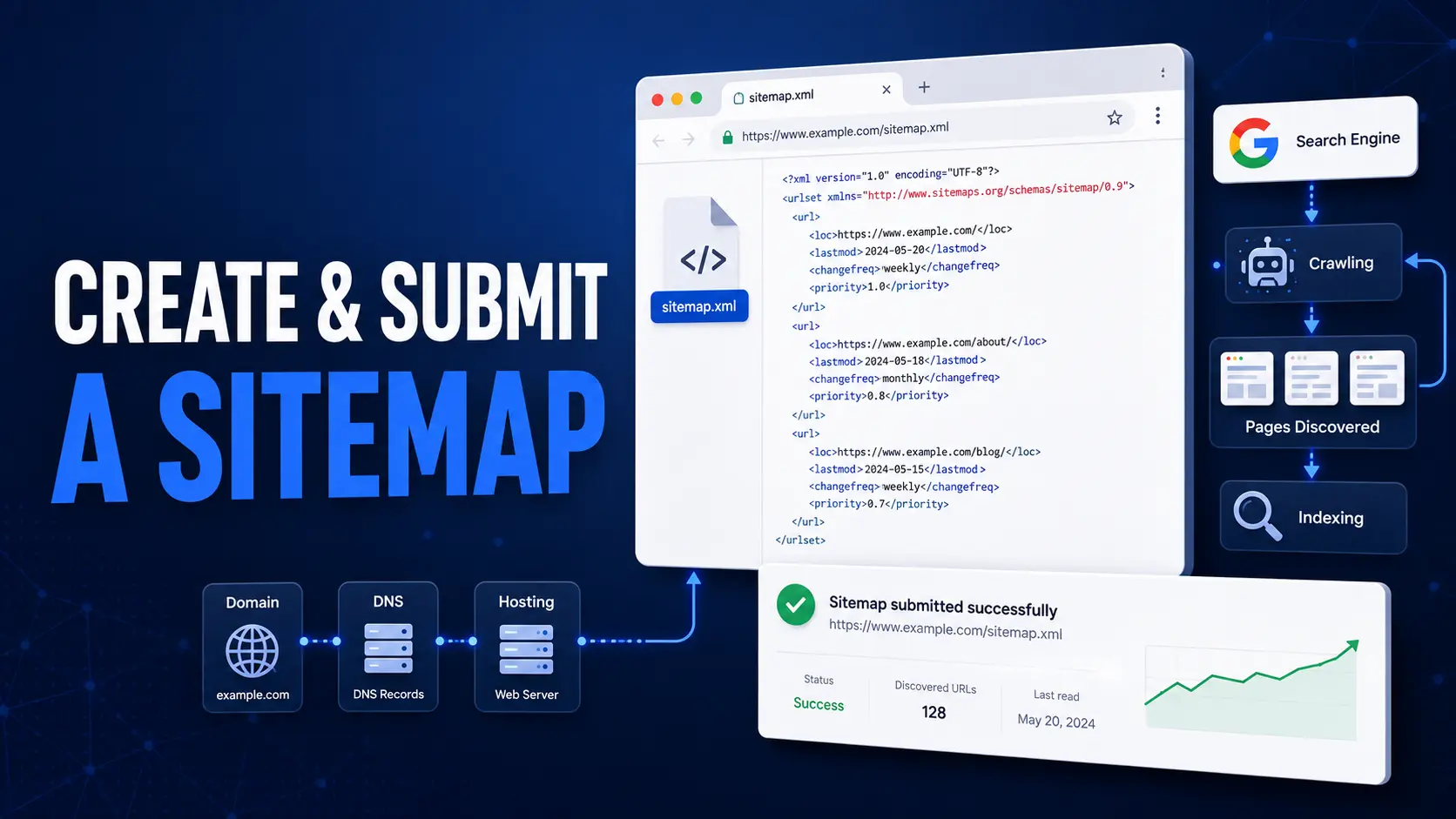
A sitemap is a file—usually XML—that lists the important pages on your website.
It tells search engines:
- Which pages exist
- How they’re structured
- When they were last updated
It doesn’t guarantee rankings, but it removes guesswork. Instead of relying entirely on crawling links, Google gets a clean map of your site.
This is especially useful if:
- Your site is new
- You don’t have many backlinks yet
- Some pages aren’t well-linked internally
Types of Sitemaps You Should Know
You don’t need all of these to start, but understanding them helps.
XML Sitemap (What You Need)
This is the standard sitemap submitted to search engines. It’s machine-readable and usually located at:
yoursite.com/sitemap.xml
HTML Sitemap (Optional)
A user-facing page listing your site’s structure. Helpful for navigation, but not essential for SEO.
How to Create a Sitemap
The method depends on how your site is built.
Option 1: Use a CMS Plugin (Recommended for Beginners)
If you’re using WordPress or a similar platform, plugins handle this automatically.
Popular options:
- Built-in sitemap (WordPress includes one by default now)
- SEO plugins like Yoast or Rank Math
Once activated, your sitemap is generated and updated automatically as you add content.
Option 2: Use an Online Generator
If your site is static or custom-built:
- Use a sitemap generator tool
- Download the XML file
- Upload it to your website’s root directory
Make sure it’s accessible via a public URL.
Option 3: Create It Manually (Rarely Necessary)
You can write an XML sitemap by hand, but this only makes sense for very small sites. It’s easy to make formatting mistakes, so automation is usually better.
Where to Place Your Sitemap
Your sitemap should be accessible at a clean URL, typically:
If it’s not there, Google may still find it—but you’re making things harder than they need to be.
How to Submit a Sitemap to Google
Once your sitemap exists, submission takes a few minutes.
Step 1: Open Google Search Console
Log into your account and select your website property.
If your site isn’t verified yet, you’ll need to do that first.
Step 2: Go to “Sitemaps”
In the sidebar, find the Sitemaps section.
Step 3: Enter Your Sitemap URL
Type: sitemap.xml
(or your full sitemap path if different)
Step 4: Click Submit
That’s it. Google will process it and begin using it as a reference for crawling.
What Happens After You Submit
Submission doesn’t mean instant indexing.
Google will:
- Read your sitemap
- Queue pages for crawling
- Decide which pages to index
This process takes time, especially for new sites.
If your domain was recently connected to hosting, DNS propagation may still be stabilizing—meaning Google might see inconsistent versions of your site during the first day or two.
How DNS and Hosting Affect Sitemap Indexing
This is where many beginners get tripped up.
If you’ve just completed your web hosting setup and connected your domain name, your site might not be fully visible everywhere yet.
Because of DNS propagation:
- Some servers see your site
- Others don’t
- Some may still show an old version
If Google crawls during this window, it might:
- Miss pages
- Delay indexing
- Show temporary errors
This is normal. It’s not a sitemap problem—it’s timing.
Common Sitemap Mistakes (and How to Avoid Them)
Including Broken or Redirected URLs
Your sitemap should only list clean, working pages.
Avoid:
- 404 pages
- Redirect chains
- Duplicate URLs
Submitting Multiple Conflicting Sitemaps
Stick to one primary sitemap unless you have a large or complex site.
Forgetting to Update It
If you’re not using automation, your sitemap can quickly become outdated.
Blocking Pages via Robots.txt
If a page is in your sitemap but blocked from crawling, it sends mixed signals.
Troubleshooting: When Your Sitemap Isn’t Working
If things don’t look right in Search Console, check these first.
Your Site Isn’t Fully Connected Yet
Revisit how to connect a domain to hosting:
- Confirm nameservers are correct
- Double-check DNS records
- Ensure hosting is active
DNS Propagation Isn’t Complete
If you made recent changes, wait up to 48 hours before assuming something is broken.
Your Sitemap URL Isn’t Accessible
Open it in your browser. If it doesn’t load, Google can’t access it either.
Your Site Isn’t Indexed at All
Make sure:
- Your site isn’t set to “noindex”
- You haven’t blocked search engines in settings
- Your domain is live globally
A Simple Workflow That Actually Works
For beginners, the cleanest path looks like this:
- Set up hosting
- Connect domain using nameservers
- Wait for DNS propagation
- Install your website (WordPress or otherwise)
- Generate sitemap automatically
- Submit sitemap in Google Search Console
Skip steps or rush the order, and things start breaking in subtle ways.
Practical Tips That Save Time
- Don’t submit a sitemap before your site is live
- Avoid making repeated DNS changes in a short window
- Use one reliable method (nameservers or A records—not both randomly)
- Check your sitemap periodically, not obsessively
Most issues come from impatience, not complexity.
Final Thoughts
A sitemap is one of the easiest technical SEO wins available—but only when the foundation is solid.
If your domain isn’t properly connected to hosting, or your DNS settings are still propagating, search engines won’t get a consistent view of your site. Fix that first, then let your sitemap do its job.
Once everything is aligned, you’re no longer hoping Google finds your pages—you’re showing it exactly where to look.